
Gas prices near you: cheap, fair or overpriced.
The free app that compares each station's gas price with the others nearby, across Quebec. Map and list, no account.
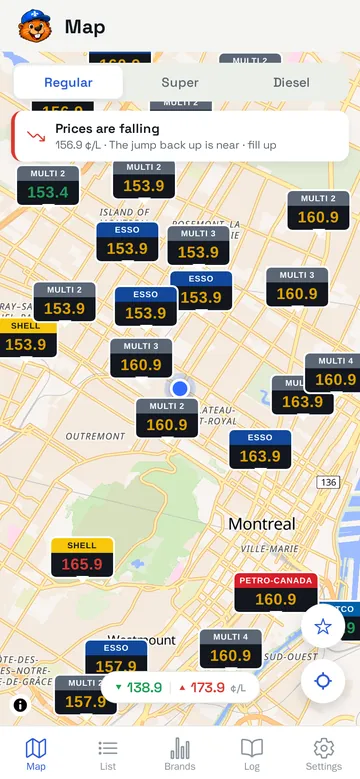
- Nearly 2,500 stations in Quebec (November 2026)
- Gaztor rereads prices every 2 minutes
- Free, no account
How it works
Open the map. Allow location: stations around you show up with their price.
Check the badge. Cheap, Fair price or Overpriced, compared with the other stations nearby.
Pick one and go. Every price shows when it was confirmed.
No account. Your location is never stored.
- No account. No sign-up, no email, no password.
- Your location is only used to show nearby stations. It's never stored on our servers.
- Your log and favourites stay on your device. You can export them at any time.
- Anonymous statistics you can turn off. Gaztor counts which features are used, with approximate region and city and the referring site, with no identifier and no GPS location. One switch in Settings turns them off.
- This page uses no cookies.
What Gaztor does
Map with badges
Stations around you, each with a cheap, fair or overpriced badge. Regular, premium or diesel.
Sorted list
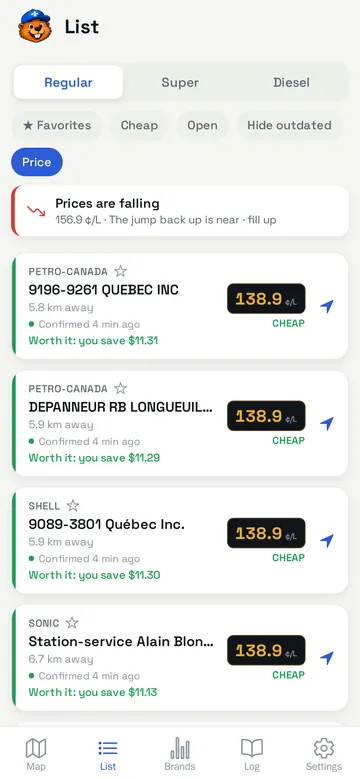
Sort by price or distance, and show only stations that are open. Stale prices can be hidden.
Worth the detour?
For each station, what you save or lose in dollars once you pay for the gas the detour burns, based on your car's fuel use and tank size.
Fill-up log
Track your fill-ups: monthly spending, real fuel use and savings compared with the local average.
Favourites
Tap the star and keep your usual stations handy.
In Greater Montreal, prices go up at night
From November 9 to 15, 2026, 3 out of 4 price hikes in Greater Montreal happened between 9 p.m. and 1 a.m. Early evening, before 9 p.m., is often the best time to fill up.
Regular gas, hikes of 3¢/L or more. Greater Montreal: Montréal, Laval, Montérégie, Laurentides, Lanaudière. Gaztor analysis.
Frequently asked questions
Is Gaztor free? Do I need an account?
Gaztor is free and doesn't need an account.
Where do the prices come from?
They are the prices reported by the gas stations. Gaztor rereads them every 2 minutes and compares them.
What do cheap, fair and overpriced mean?
Gaztor compares each price with the other stations around you. Cheap: among the lowest 25% nearby. Overpriced: among the highest 25%. In between: Fair price.
How does "Worth the detour?" work?
Gaztor compares what you save on the fill-up with the gas you burn on the round trip, based on your car's fuel use and tank size (8 L/100 km and 50 L by default, editable in Settings). It's an estimate: the real distance depends on the road.
Are the prices up to date?
Each station shows when its price was confirmed. Prices that haven't changed in a long time can be hidden.
Is my location kept?
No. It's only used to show stations around you and is never stored on our servers.
How do I install Gaztor on my phone?
Gaztor isn't on the App Store or Google Play yet. You add it to your home screen from the browser. See how
Will I lose my data if I clear my browser?
Yes: your log is stored in the browser. Export a backup from Settings from time to time.

Install on iPhone
- Open the map in Safari.
- Tap Share (the square with an arrow pointing up).
- Choose "Add to Home Screen", then "Add".
Install on Android
- Open the map in Chrome.
- Tap the ⋮ menu in the top right.
- Choose "Install app" (or "Add to Home screen").
You install it from the map (app.gaztor.ca), not from this page. The Gaztor icon then shows up with your other apps.